
Connect to the intended IED
Use the relay IP on an authorized test, FAT, SAT or commissioning network. Keep the first session read-only.
ARSAS can discover the running IED model from a reachable device on an authorized engineering network, or open an existing SCL source. Keep observed live evidence separate from configured project intent, then prepare bounded IID, ICD or CID output for the next engineering system.
ARSAS treats engineering data as evidence, not just screen output. The exact fields depend on the workflow, but the source and acquisition context should remain visible whenever they exist.
ICD commonly describes what an IED can support. CID commonly describes the configuration delivered to one IED. SCD represents the integrated substation project. IID is commonly used for an instantiated IED description exchanged during engineering updates. These are practical roles, not permission to ignore edition, schema, project-profile or vendor rules.
You do not need a vendor SCL file to start a read-only live discovery. ARSAS first identifies what the running server exposes; export is a later engineering decision with an explicit receiving-system target.
Use the relay IP on an authorized test, FAT, SAT or commissioning network. Keep the first session read-only.
Build physical identity, MMS hierarchy, typed data, DataSets, RCB inventory and available-service evidence from the live server.
Choose whether the task needs monitoring only, a full bounded device baseline, or one selected reporting path.
Generate IID Edition 2 or ICD Edition 1 from complete live discovery where appropriate, or prepare a selected-RCB CID baseline when that is the receiving contract.
A capability-oriented description supplied for system engineering. It commonly represents the functions, data and communication features an IED family or configuration can offer.
A device-focused configured description intended for one IED. It may include communication, DataSets, reports, GOOSE and project-specific settings.
The wider integrated system model produced by system configuration engineering, including multiple IEDs, communication relationships and substation context.
An instantiated IED description used in supported engineering exchange or update workflows, especially where Edition 2-oriented tooling expects device-specific system context.
A specification-oriented view of substation functions and topology before all IED implementation details are assigned.
The same extension does not guarantee identical schema edition, namespace, optional content or importer behavior. Confirm the receiving contract.
Use the intended IED endpoint on an authorized engineering network when the available vendor file is missing, outdated or cannot explain the online server model.
Preserve exact identity, model, DataSet and RCB evidence while avoiding an oversized multi-IED project file for a limited receiver.
Keep differences visible instead of silently replacing the source file or assuming the running IED exactly matches the project SCL.
Prepare a selected-RCB CID baseline when the receiving SAS or gateway needs one explicit reporting path.
An SCL file can be stale or incomplete. A live IED model can omit wider project relationships. Preserve both, record provenance and make differences reviewable rather than declaring either source universally correct.
Record the target tool, edition, expected IED identity, required services and whether it needs IID, ICD, CID or another approved SCL scope.
Connect to the intended IED on an authorized engineering network for complete MMS discovery, or open the available SCD, CID, ICD, IID, SSD or compatible XML. Keep the original file unchanged.
Separate the physical IED name from MMS domains and Logical Devices. Review Logical Nodes, Data Objects, Data Attributes, types and Functional Constraints.
Check member order, exact runtime RCB names, trigger options, optional fields, report IDs, configuration revision, endpoint and available GOOSE or communication identity.
Generate Edition 2 IID or Edition 1 ICD from complete live discovery where appropriate, normalize a single-IED source, or select one verified RCB for a bounded CID baseline.
Review SCL, companion evidence and findings, then import into the intended SAS, gateway or engineering tool. Record every rejection or modification instead of editing identity by trial and error.
Run a read-only availability audit, choose one usable RCB, preserve its verified DataSet membership and available configuration evidence, then export the approved Edition 1 or Edition 2 CID baseline.
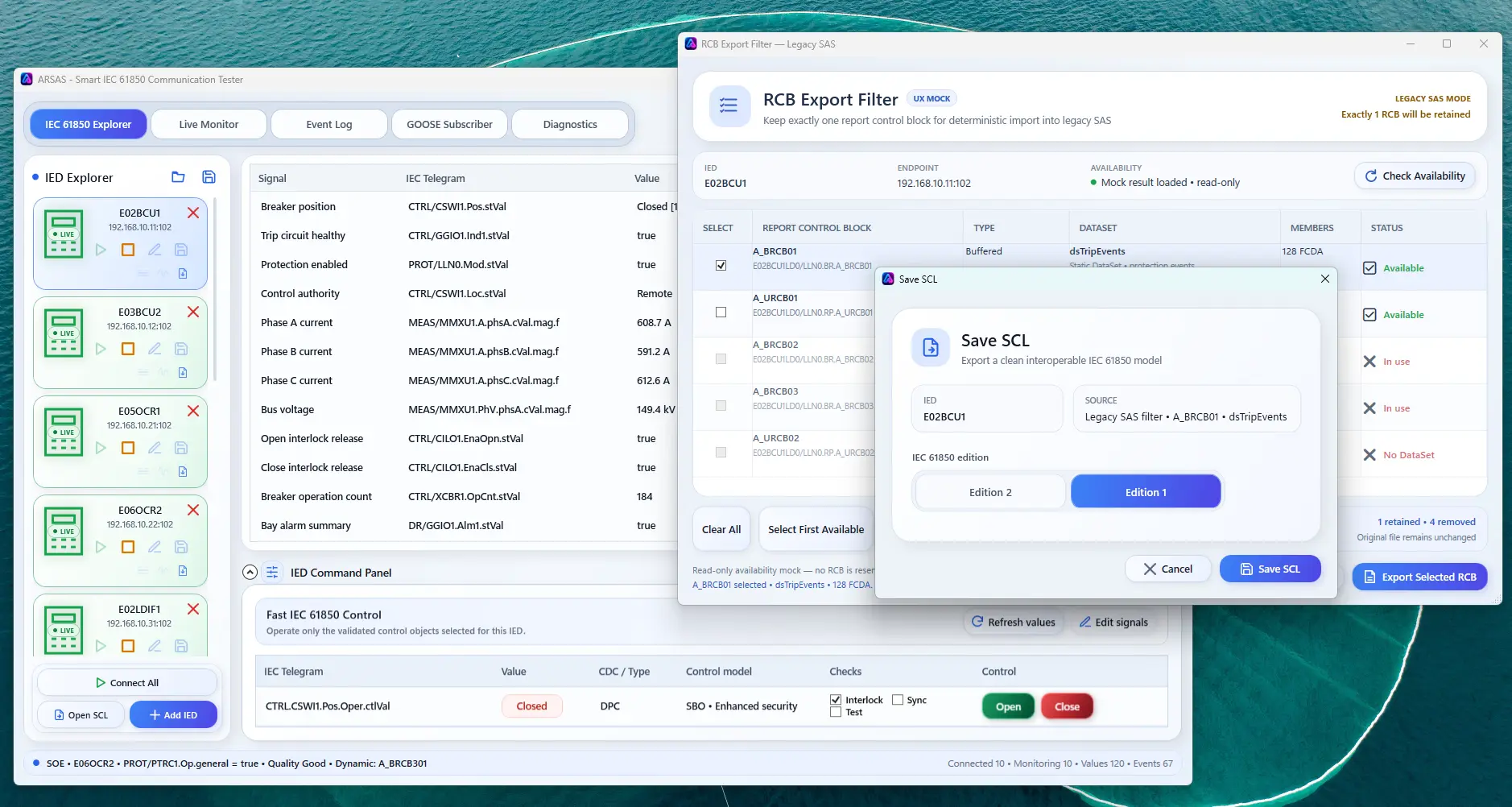
Keep the exact runtime RCB name, verified DataSet directory, trigger options, optional fields, buffer time, integrity period, report ID and configuration revision where available.
Confirm the expected IEC 61850 edition, namespace, schema location and receiving-tool profile.
Check physical IED name, AccessPoint, IP address, MMS domains and Logical Device names. Do not substitute one identity level for another.
Verify member references, Functional Constraints, ordering and whether the receiver requires a specific reporting scope.
Preserve concrete runtime names and check report ID, configuration revision, trigger options, optional fields and reservation expectations.
Use a bounded single-IED or selected-RCB output instead of passing a complete project to a receiver with limited scope.
Compare the receiver's imported tree, DataSets, RCBs and communication settings with the source evidence. XML validity alone is not success.
ARSAS can preserve source identity, live discovery, model relationships, selected reporting evidence, output findings and provenance for engineering review.
The receiving tool may enforce proprietary rules beyond the standard. Generated output does not prove project-wide SCL correctness, GOOSE/subscriber behavior, Reporting interoperability or IEC 61850 conformance.
Use GOOSE Analyzer to verify publisher identity, sequence, TAL and payload order, while keeping subscriber operation and end-to-end protection acceptance as separate tests.
Installer and portable packages share the same application scope. Verify the published SHA-256 and review the release boundary before field use.
Release notes, limitations and signing status →