
Inspect GOOSE identity, sequence, timing and payload context; use bounded SMV capture where the workflow applies.
GOOSE analysis →Practical tutorial · read-only capture · station and process bus
See who publishes GOOSE, what changed and whether the stream stays alive.
ARSAS turns raw Ethernet frames into a publisher-level view of identity, state, retransmission and payload. The goal is not merely to see packets: it is to explain which stream was observed, what state changed, how the sequence behaved and what still requires subscriber-side verification.
Evidence contract
Keep the observation together with the context that makes it reviewable.
ARSAS treats engineering data as evidence, not just screen output. The exact fields depend on the workflow, but the source and acquisition context should remain visible whenever they exist.
What?Signal, event, packet, file, model or command result
Which IED?Device identity, endpoint and project context
When?IED time, protocol time or ARSAS receive/capture time when available
Quality / state?IEC quality, event state, sequence state or result status when the source provides it
How acquired?Discovery, MMS read, Reporting, GOOSE/SMV capture, file service or control workflow
No invented certainty.Not every workflow exposes every field. ARSAS should preserve what is actually available, identify the acquisition path and keep missing context explicit rather than synthesizing proof.Review field interoperability evidence →Review engineering boundaries →
Investigation workflow
When something happens, follow the evidence from network behavior to the disturbance record.
ARSAS keeps these views connected by IED and engineering context. Start with the clue you have; move deeper only when the next source can answer a new question.
Keep signal reference, state, quality, IED time, receive context and acquisition source together.
Event evidence →Stay inside the originating IED session, scan remote files and preserve completeness and transfer state.
Retrieve records →Open the record in ARSAS and inspect synchronized analog/digital evidence, trigger position and protection channels.
See native analysis →Compare the available times and states across sources while keeping clock, source and acquisition differences visible.
Review evidence boundaries →Correlation is not automatic causation proof.GOOSE capture time, IED event time, Reporting receive time and COMTRADE time can come from different clocks and acquisition paths. ARSAS helps keep them reviewable; protection acceptance still requires the approved test method and independent engineering checks.
30-second takeaway
GOOSE repeatedly publishes a state so subscribers can detect changes and loss of communication.
A publisher sends multicast Ethernet frames identified by items such as destination MAC, VLAN, APPID and goCBRef. When the application state changes, stNum normally changes. Repeated frames for the same state advance sqNum. Time Allowed to Live tells a subscriber how long the stream may remain absent before it should be considered expired.
When to use the GOOSE Analyzer
Use it when the question begins with publisher traffic or network delivery.
Confirm the expected publisher is visible
Check the intended interface, VLAN, APPID, destination MAC and control-block reference before investigating subscriber logic.
Observe sequence behavior around an event
Verify that the state number changes and rapid retransmission follows an approved source-state transition.
Separate absent traffic from wrong interpretation
Distinguish no publisher, wrong network identity, stale sequence, TAL expiry, test flags and payload-mapping uncertainty.
Compare observed traffic with SCL intent
Use configured communication and DataSet context to explain the publisher and ordered allData values.
Collect the expected stream identity.
- Approved capture location and network interface
- Expected publisher IED and GOOSE control block
- Destination MAC, VLAN ID and priority where configured
- APPID,
goCBRefand DataSet reference - An approved source-state stimulus and independent indication
Capture is passive, but network access still requires approval.
Use only an authorized mirror port, test switch or approved segment. Installing Npcap and observing traffic does not authorize changing protection logic, injecting GOOSE, disabling redundancy or applying an operational stimulus.
Core concepts
Six fields explain most first-line GOOSE investigations.
Publisher identity
Destination MAC, VLAN, APPID, goCBRef and DataSet reference distinguish one intended stream from nearby multicast traffic.
stNum
The state number normally changes when the published DataSet state changes. A new stNum is evidence of publisher-side state transition, not automatic proof of subscriber operation.
sqNum
The sequence number advances for retransmissions of the current state. It commonly restarts when stNum changes.
Retransmission
GOOSE sends rapidly after a change, then typically slows toward a steady rhythm. The exact timing is implementation and configuration dependent.
Time Allowed to Live
TAL is the publisher's declared supervision window. A subscriber should receive a refresh before the current window expires.
allData payload
The values are ordered according to the DataSet. SCL or another trustworthy model source is needed to assign engineering meaning to each leaf.
Step-by-step in ARSAS
From approved network access to attributable GOOSE evidence.
Confirm the capture boundary
Record the intended station/process-bus segment, switch or mirror port, test authority and expected publisher. Do not begin from an unknown production adapter.
Select the approved network adapter
Open the GOOSE Analyzer and choose the interface connected to the intended segment. Confirm Npcap is available and avoid selecting Wi-Fi, VPN or unrelated adapters by guesswork.
Identify the publisher stream
Match destination MAC, VLAN, APPID, goCBRef and DataSet reference with the approved design. A familiar payload alone is not sufficient identity.
Establish the steady-state sequence
Observe the current stNum, advancing sqNum, retransmission interval, TAL, Test and ndsCom flags before applying a stimulus.
Apply one approved state change
Change a known source point under the approved FAT/SAT procedure. Confirm the expected stNum transition, sqNum restart or progression and rapid retransmission pattern.
Map the payload and record findings
Compare ordered allData values with SCL or verified model context. Save the stream identity, sequence observation, flags, capture context and any uncertainty that still needs subscriber-side proof.
Success criteria
A useful GOOSE observation answers four separate questions.
Correct streamPublisher identity matches the approved design
Healthy refreshSequence and TAL show continuing publisher activity
Observed transitionThe approved source change produces explainable state behavior
Known payloadValues are mapped or explicitly marked unresolved
Real application evidence
Inspect stream identity, sequence and payload in one view.
Use the stream table to choose the publisher, then review sequence, flags, timing and ordered payload without losing the project context.
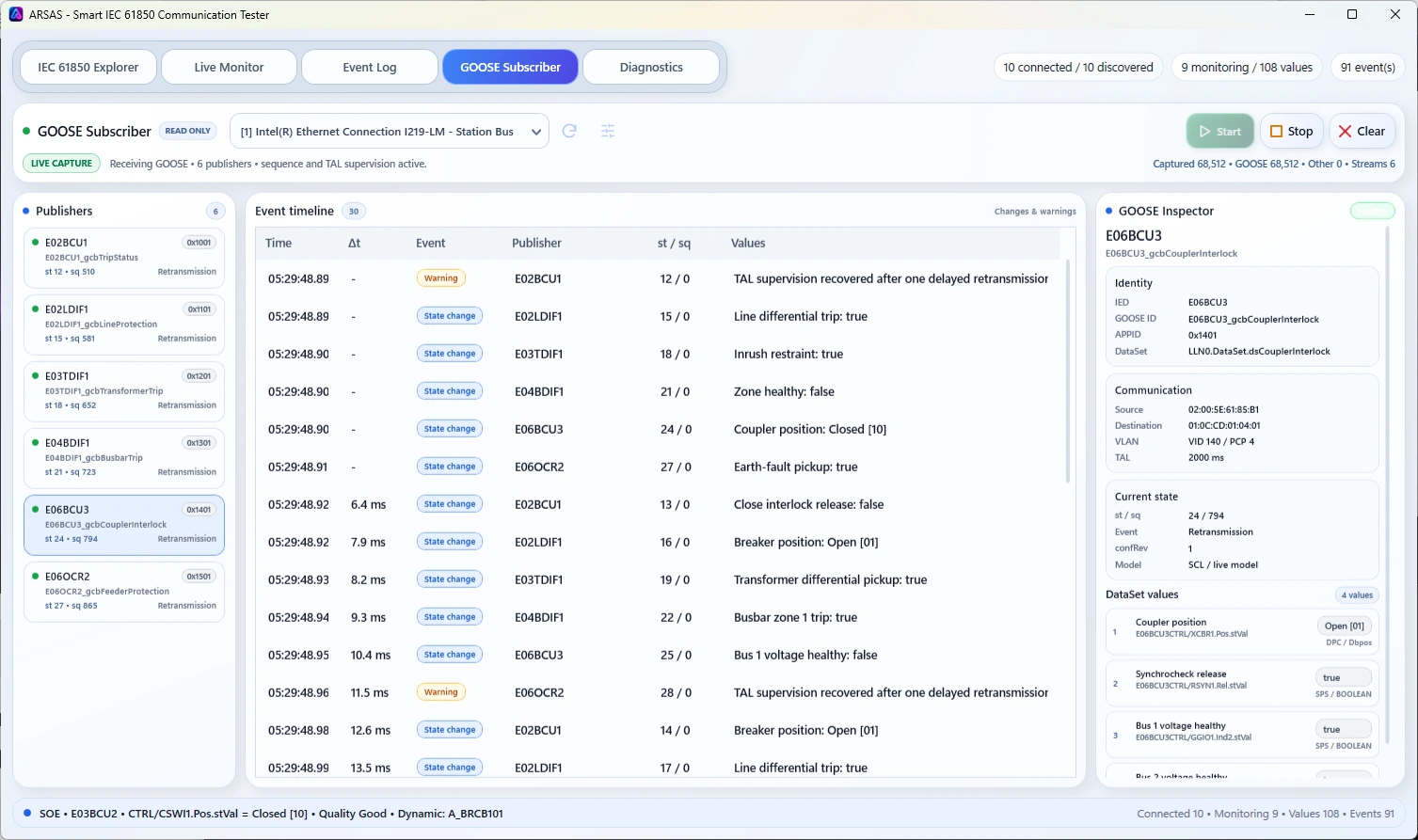
GOOSEPublisher-level supervision
Review APPID, VLAN, destination MAC, control-block identity, stNum, sqNum, TAL, flags and ordered payload together.
If the result is wrong
Use the symptom to locate the next check.
No GOOSE streams appear
Check the selected adapter, Npcap, mirror configuration, VLAN visibility, switch path and whether the publisher is enabled.
The stream appears, but identity is wrong
Compare MAC, VLAN, APPID, goCBRef and DataSet reference with the correct SCL revision.
sqNum advances, but stNum never changes
The publisher may be retransmitting a steady state. Verify that the approved stimulus changes the actual DataSet member and that the source logic is active.
stNum changes unexpectedly
Check process chatter, quality changes, configuration revision, simulation/test state and whether another source affects the DataSet.
TAL expires or refresh is irregular
Investigate publisher health, switch path, VLAN handling, redundancy, capture loss and network congestion before blaming the subscriber.
The payload cannot be interpreted
Verify DataSet ordering in SCL, edition/revision alignment and type context. Keep unmapped leaves unresolved.
Publisher traffic and sequence evidence at the capture point
ARSAS can show which stream was observed, how its state and retransmission sequence behaved, whether refresh continued and how much payload meaning could be bound to engineering context.
Publisher capture is not end-to-end protection acceptance.
It does not prove that every network path delivered the frame, that the intended subscriber accepted it, that protection logic operated, or that trip timing and redundancy satisfy the scheme requirement. Those need approved independent tests.
What is the difference between stNum and sqNum?
stNum normally changes when the published state changes. sqNum advances as the publisher retransmits the current state and commonly restarts after a new state number.Does visible GOOSE traffic prove the subscriber operates?
No. It proves publisher traffic was visible at the selected capture point. Subscriber logic, output operation and end-to-end timing require separate evidence.
Can ARSAS transmit or inject GOOSE?
The GOOSE Analyzer is a read-only inspection workflow and does not transmit GOOSE frames.
Next lesson
Use SCL to explain what the observed stream was intended to carry.
Learn the difference between ICD, CID, SCD and IID, compare configured intent with the live system, and prepare bounded output without treating generated files as automatic acceptance.
Verified stable · ARSAS 1.6.41
Ready for an approved Windows workstation?
Installer and portable packages share the same application scope. Verify the published SHA-256 and review the release boundary before field use.
Release notes, limitations and signing status →