
Verify that the intended IED answers
Separate basic network reachability, TCP port 102, MMS association and usable model discovery instead of calling all four “connected.”
Use ARSAS as an IEC 61850 MMS client to move from a relay endpoint on an authorized engineering network to a model you can inspect and a value you can explain. A green connection indicator is only the beginning: the useful result is the correct IED, object reference, value, quality, timestamp and acquisition source kept together.
ARSAS treats engineering data as evidence, not just screen output. The exact fields depend on the workflow, but the source and acquisition context should remain visible whenever they exist.
Through MMS, ARSAS can associate with the IED, discover its named functions and data, read typed values, inspect DataSets and Report Control Blocks, transfer supported files and prepare approved control workflows. The important distinction is simple: connection proves reachability; discovery proves a model; value, quality, time and identity make an observation useful.
This workflow is useful before deeper Reporting, SCL, file-transfer or control testing.
Separate basic network reachability, TCP port 102, MMS association and usable model discovery instead of calling all four “connected.”
Use live discovery when a vendor file is unavailable, stale or needs comparison against the online IED.
Confirm object references and Functional Constraints before selecting points for Reporting or bounded polling.
When discovery is complete, continue toward IID Edition 2 or ICD Edition 1 generation and explicit receiving-system validation.
Live discovery and value reads should be separated from active control, RCB modification and IED configuration changes. Do not write or operate until the project procedure, plant authority and rollback plan explicitly permit it.
Do not skip identity and quality checks merely because the association succeeds.
Record the expected device identity and verify the approved network interface, subnet, route and VLAN. Ping can help with basic IP reachability, but it does not prove IEC 61850 MMS service.
Open General IEC 61850 Testing, choose Add IED, enter a clear device name, the relay IP address on the authorized engineering network and port 102 unless the project specifies another endpoint.
Connect and retain the exact diagnostic if the association is refused, times out or closes. A successful TCP socket is not the same as an accepted MMS association.
Confirm that the discovered physical identity is plausible, then inspect Logical Devices, Logical Nodes, Data Objects, Data Attributes, DataSets and RCBs. An unexpectedly small or empty tree is evidence to investigate.
Search for a familiar indication or measurement. Keep the complete IEC reference and choose the correct Functional Constraint—for example status, measurement, configuration or control context—rather than selecting a similar-looking name.
Read the value together with IED identity, full reference, MMS type, quality, device timestamp, ARSAS capture time and acquisition source. Compare it with an independently known plant state before treating it as evidence.
The application-level client/server session. It comes after network and TCP reachability and before useful IEC 61850 services.
The full identity of the data inside the IED. Preserve it; a short display label is not enough for reproducible evidence.
The service context of an attribute, such as status, measurement, configuration or control. Similar names under different FCs are not interchangeable.
Quality says whether the observation can be trusted. Timestamp says when the IED or process associated the change with time.
A DataSet selects members; a Report Control Block governs how selected changes are delivered. Discovery is preparation—not proof that reporting works.
The live model is current server evidence. SCL represents configured engineering intent. Compare both when integration depends on consistency.
Check cable, adapter address, subnet, route, VLAN, duplicate IP and approved network boundaries.
Check MMS enablement, firewall, ACL, service binding and whether another IED interface is intended.
Capture the exact diagnostic. Investigate server limits, concurrent clients, access policy, authentication or edition-specific behavior.
Check access rights, discovery diagnostics, model limits and whether the connected endpoint is really the intended server.
Confirm the object reference, Functional Constraint, type, quality and timestamp. Compare with SCL and an independent plant indication.
The next problem is Reporting coverage, ownership, trigger options or delivery—not basic MMS discovery.
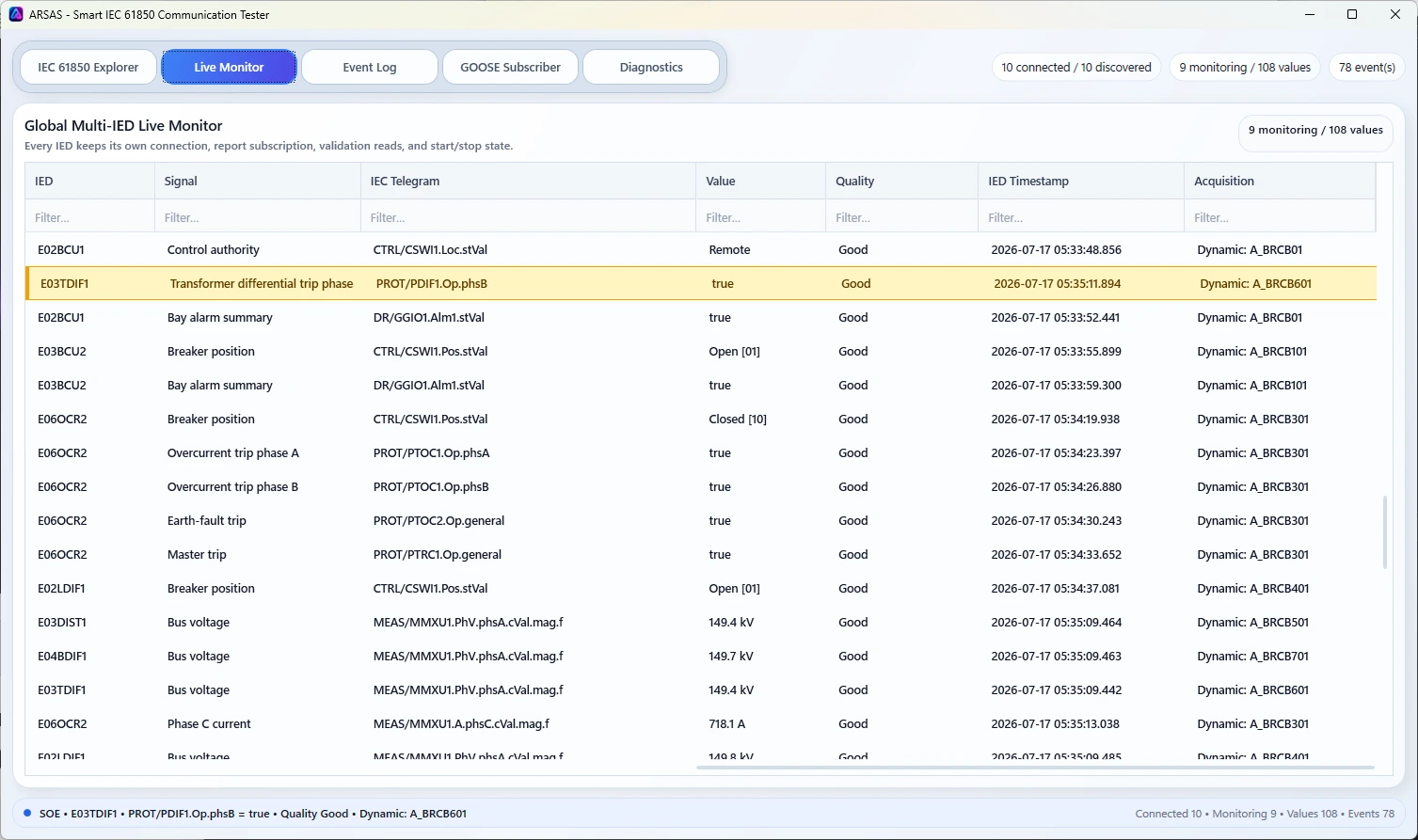
Start from the intended IED identity and relay IP address on the authorized engineering network without requiring a usable vendor SCL file for the first read-only discovery.
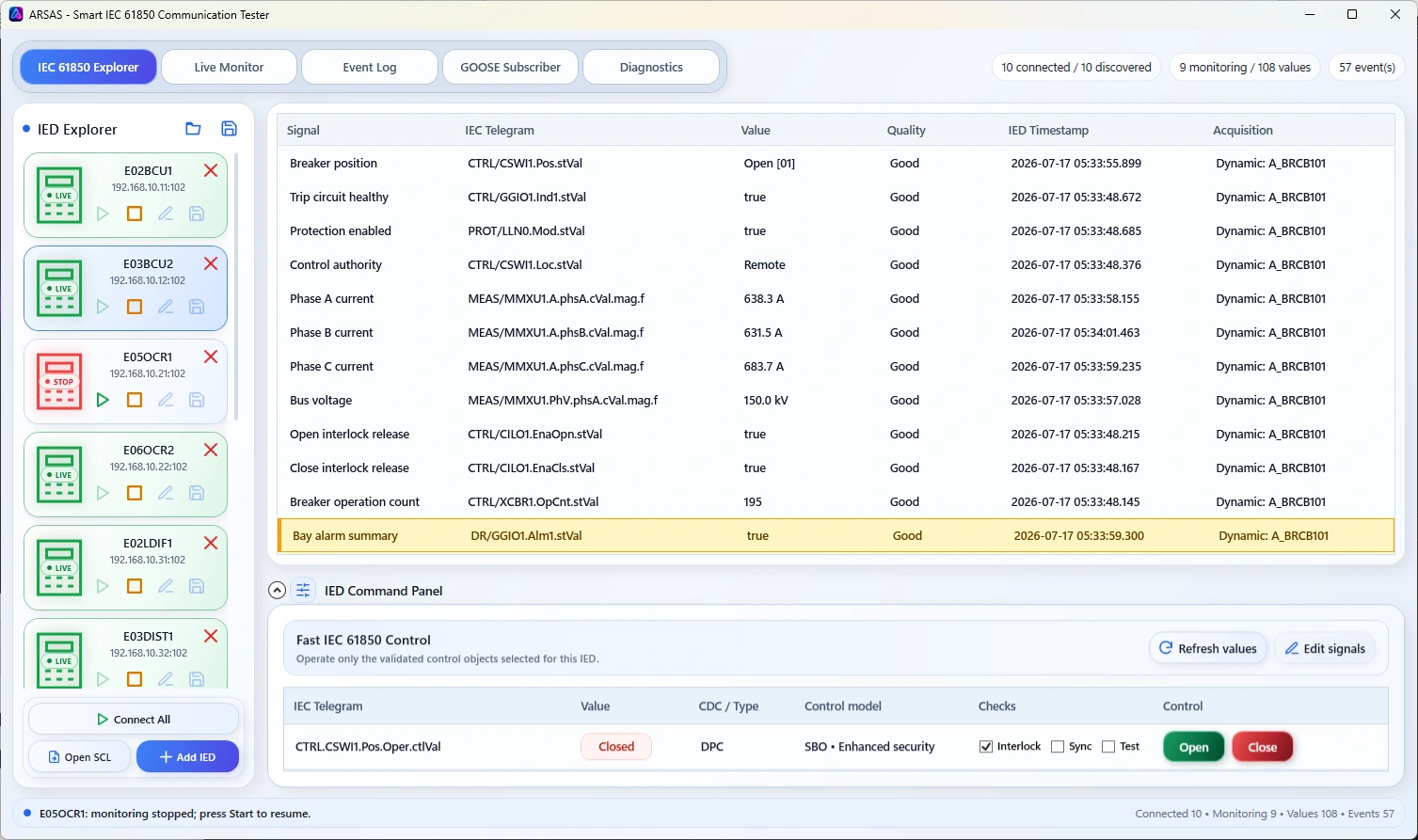
Review the device, full reference, value, quality, timestamp and acquisition source together.
ARSAS can preserve what endpoint answered, what model it exposed, what object was read and what supporting quality, time and source context accompanied the value.
Association and discovery do not prove Reporting, file service, GOOSE binding, controls, receiving-system acceptance, model correctness or IEC 61850 conformance. Those remain separate service-specific validations.
Learn how DataSets select signals, how BRCB and URCB deliver updates, how ARSAS validates exact coverage and why visible polling fallback is better than a hidden gap.
Installer and portable packages share the same application scope. Verify the published SHA-256 and review the release boundary before field use.
Release notes, limitations and signing status →