
Five-minute beta.6 evaluation

Run the closed-loop feeder test before connecting live traffic.

This sequence verifies source T0, virtual analog wiring, relay acquisition/protection, relay BO behavior, independent TESTSET BI timing, auto-stop, frozen evidence, and one-click re-arm without Npcap or external IEC 61850 equipment.

Before you begin

Use the official beta.6 package.

1

Verify the package

Download v0.1.0-beta.6 from GitHub Releases and compare SHA-256 with SHA256SUMS.txt.

2

Stay internal

Npcap, a merging unit, and field relay hardware are not required for this first workflow.

3

Know the boundary

The timing model is deterministic behavioral software evidence, not calibrated relay-test equipment.

Closed-loop feeder run

Exercise the complete external virtual-I/O path.

  1. Launch ARVREL and select the feeder Protection Relay / Internal demo path.
  2. Review Relay settings and confirm the intended protection elements, thresholds, and delays.
  3. Review the configured 4I+4V source setpoints and CT/VT context.
  4. Select a deterministic fault preset such as A-G or A-B-G.
  5. Press START. This establishes TESTSET T0 and energizes the configured source.
  6. Observe RELAY ANY PU [source]. This is the first generic protection pickup that requests BO2.
  7. Observe TESTSET BI2 ACCEPT. It is the accepted external generic ANY-PICKUP contact edge and may occur later than the relay pickup request.
  8. Read the operated element separately. Its pickup and P→T belong to that element and are not inferred from generic BI2.
  9. Observe the live relay trip request and then TESTSET BI1 ACCEPT. BI1 is the authoritative external measured trip.
  10. If trip auto-stop is enabled, confirm output turns off only after accepted BI1 and the UI shows OUTPUT OFF · FROZEN CAPTURE.

What success looks like

The timing rail remains causal.

Pickup

Generic and operated-element timing remain separate

BI2 can be earlier than the eventual operated-element pickup when another enabled element picks up first.

Trip

BI1 owns TESTSET measured trip

Relay internal TripLatched may request BO1, but the TESTSET result exists only after the virtual contact/wire/BI path is accepted.

Capture

Setpoints retained, output zero

After auto-stop, configured source values remain for repeatability while actual output is explicitly OFF and evidence is frozen.
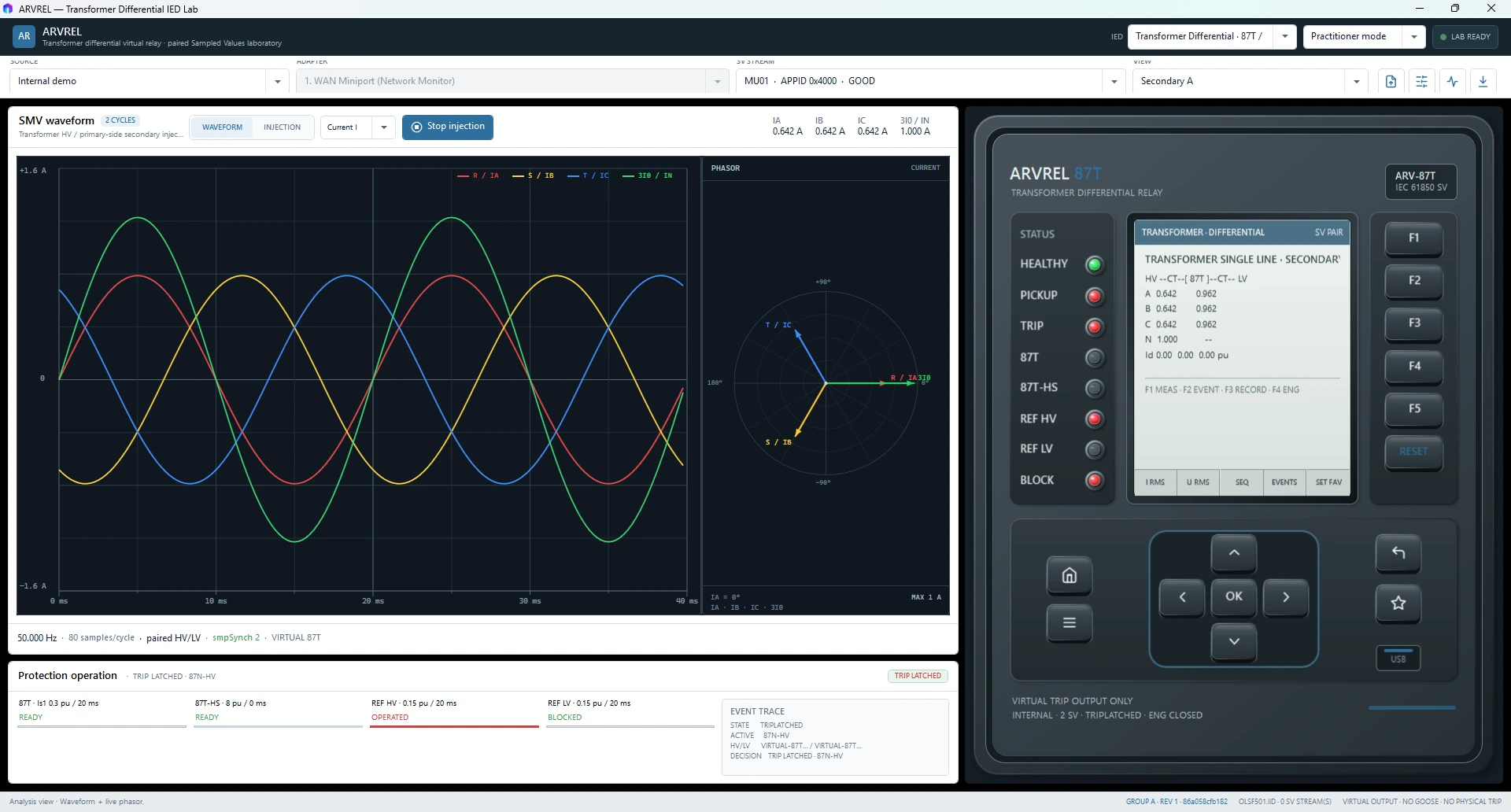
ARVREL workspace with waveform, phasor, relay faceplate, protection state, and event evidence
Treat the timing rail and evidence chain as the authority, not a visual trip lamp alone.

One-click re-arm

Press relay RESET once.

  1. With output already OFF after auto-stop, press the relay RESET once.
  2. ARVREL advances the causal acquisition in modeled 250 µs relay quanta until stale fault pickup drops out.
  3. The reset transaction clears relay latch/timers once and continues feedback until BO1/BO2 plus TESTSET BI1/BI2 are LOW.
  4. Wait for READY TO RE-ARM.
  5. Confirm the completed TESTSET timing and frozen trip evidence are still available.
  6. Start the next run.
Expected result: one RESET transaction is sufficient. Repeated clicks should not be required to flush stale acquisition state.

Prove the no-shortcut invariant

Open the virtual trip wire.

  1. Disconnect the virtual RELAY.BO1.TRIP → TESTSET.BI1.TRIP connection.
  2. Apply a fault that operates the relay.
  3. Confirm the relay may latch trip internally.
  4. Confirm TESTSET BI1 does not accept a trip edge.
  5. Confirm no external TESTSET trip time is reported and trip auto-stop does not occur.
This is intentional. If the TESTSET still reports trip with the BI1 wire open, the external-I/O authority invariant is broken.

Next internal baselines

Evaluate Transformer and AVR before adding network variables.

Transformer Differential

  1. Run the 10-scenario self-test and expect PASS · 10/10 · transformer-public-beta-v1.
  2. Use synchronized internal HV/LV/neutral injection for through-load, internal fault, and REF checks.

AVR / OLTC

  1. Use the simulated transformer/17-position OLTC plant.
  2. Inspect authority/interlocks before enabling the laboratory MMS server.
  3. Test browse/read, reports, then modeled virtual controls.

Then replay or live SV

Add external data only when it belongs to the test objective.

PCAP / PCAPNG replay

Use authorized captures and verify APPID, MAC/VLAN, svID, dataset, confRev, mapping, scaling, quality, continuity, complete windows, and trust.

Live Npcap capture

Install Npcap separately and use only an isolated, authorized laboratory network. ARVREL provides no switching authority.