◉
Three distinct characters
Move between Clean, Feedback and Smooth compression styles to match the material and the moment.
Shape vocals, polish music, and keep live audio under control. An expressive compressor with a focused interface, precise metering, and a signal path designed for responsive performance.
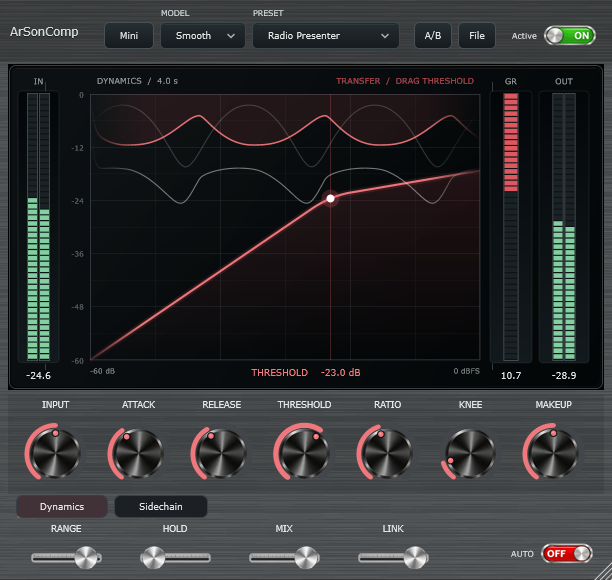
Intuitive controls and meaningful feedback, designed for fast decisions—not menu diving.
Move between Clean, Feedback and Smooth compression styles to match the material and the moment.
Read the transfer curve, compression history, and input, reduction, and output meters in one focused display.
External sidechain, detector filtering, stereo link, Peak/RMS detection, and listening when you need them.
46 factory starting points, searchable presets, A/B comparisons, automation, and host project recall.
A hardware-inspired brushed-metal surface with precise tactile controls. Switch contexts without losing track of the audio.
Download the installer for your system. Every file is hosted on the official ArSonComp GitHub Release.
Windows 10 & 11 · x64
Download for WindowsApple Silicon & Intel · macOS 11+
Download for macOSUbuntu & Debian · x86_64
Download .deb installerv0.2.0 · Stable — Owner-tested Stable, with cross-platform CI verification. macOS PKG is not Apple notarized. Release notes SHA-256 checksums
Run the OS installer. On Windows choose current-user or all-user VST3 installation; macOS may require approval in Privacy & Security.
Restart or rescan the VST3 plugins in your DAW/mixer. Or open the Standalone application and select your audio interface.
Choose a preset or start with Clean, 2:1, and adjust Threshold for around 3–6 dB of gain reduction.
Practical answers about installation, compatibility, and the current release.
Restart your DAW and rescan VST3 plug-ins. On Windows, check whether it is installed for the current user or all users; remove older duplicate copies if the host loads one first. See the installation guide.
Use the DEB installer for compatible Ubuntu/Debian x86_64 systems. For other modern glibc-based x86_64 distributions, use the portable archive and its per-user install script. Other CPU architectures are not included in this release.
The universal application and VST3 are ad-hoc signed, but the installer is not Apple notarized. Download only from the official GitHub Release and follow Apple's application approval flow if you trust the file. Do not disable Gatekeeper globally.
v0.2.0 is publicly released as Stable following the owner's physical testing and successful Windows, Linux and macOS CI. Its Stable designation is not independent multi-host certification; macOS notarization and detailed interoperability/distribution reviews remain documented follow-up items. See the release status.
Thoughtful dynamics processing. Less friction between what you hear and what you create.
Get ArSonComp